Anker Prime TB5 14-Port Thunderbolt 5 Docking Station
A 14-port Thunderbolt 5 dock with 140W charging that undercuts the CalDigit TS5 Plus — if you actually need TB5 bandwidth.
Price may vary. As an affiliate, we earn from qualifying purchases.
What we like
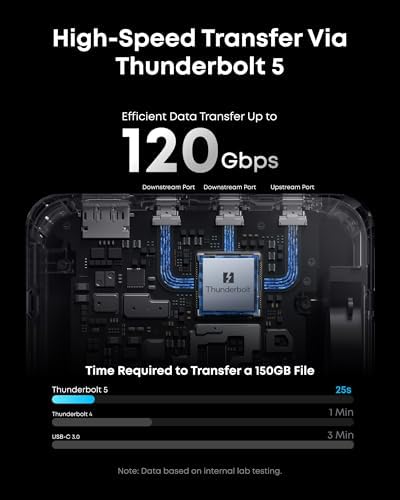
- Full Thunderbolt 5 with 120Gbps upstream and two TB5 downstream ports
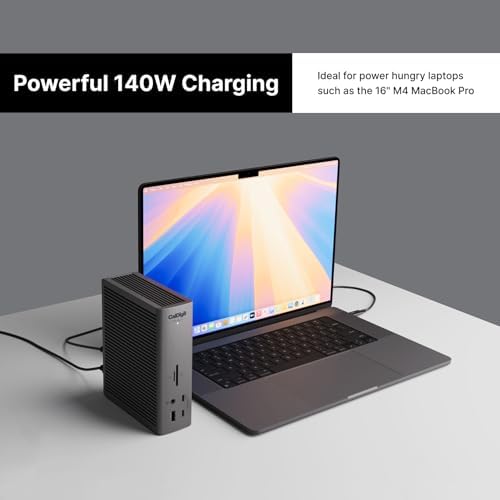
- 140W upstream charging handles a MacBook Pro 16 M4 Max under load
- 2.5GbE, HDMI 2.1, and dual UHS-II SD/TF readers built in
- Roughly $100 less than the CalDigit TS5 Plus
- Active cooling keeps it from thermal throttling under sustained transfers
Could be better
- Still $399 — Thunderbolt docks remain a premium category
- Most users don't actually need TB5 yet; a TB4 dock saves ~$100 for the same charging
- Ambient LED lighting is on by default and requires the app to disable
- Bundled TB5 cable is only 3.3 ft, which is short for desk-back routing
Full Review
The Anker Prime TB5 is the first Thunderbolt 5 dock that doesn’t feel like a science project. Fourteen ports, 140W upstream charging, and a real cooling system in a chunk of aluminum that sits on the desk and just works. At $399, it lands almost exactly $100 below the CalDigit TS5 Plus, which until recently was the only TB5 dock most people would actually recommend.
Build and Daily Use
This is a dense brick. The housing is brushed aluminum with active cooling vents, and there’s enough mass that the dock doesn’t slide around when you yank a cable. Port layout is sensible: card readers, audio, and a USB-A on the front; everything permanent on the back. Anker’s ambient LED lighting strip is the one styling choice that’s hard to ignore — it’s blue, it’s bright, and you need the Anker app to turn it off.
Thunderbolt 5 in Practice
This is where the dock earns its price, or doesn’t. With a Thunderbolt 5 host — a MacBook Pro M4 Pro or Max, or a recent Intel Core Ultra laptop — the upstream link runs at 80Gbps standard and boosts to 120Gbps for display-heavy workloads. A 150GB transfer to an external TB5 SSD lands in about 25 seconds. Plug in a TB4 laptop and everything still works, just at TB4 speeds.
Where the Money Goes
The honest comparison isn’t to other TB5 docks — it’s to the TB4 dock you probably already considered. A good TB4 dock like the OWC Thunderbolt 4 charges at the same 140W, drives the same dual 4K displays, and runs $100 less. TB5 only matters if you’re moving files between fast external SSDs or running dual high-refresh 4K panels with headroom. If you don’t, you’re paying for bandwidth you’ll never touch.
Who Should Buy This
Buy the Anker Prime TB5 if you own a TB5-capable Mac or PC and you already have — or plan to buy — externally attached NVMe storage that sustains over 2GB/s. Pros doing video work off external SSDs, or anyone running dual 4K@144Hz panels, will see the difference. Everyone else should look at a TB4 dock and pocket the $100. If you want the CalDigit polish but not the CalDigit price, this is the dock to get.