Aqara Hub M3
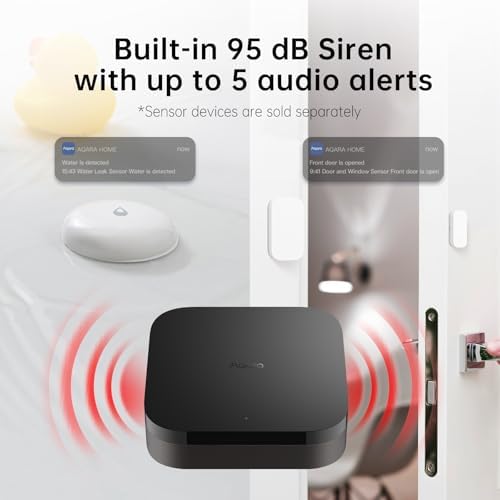
A Zigbee, Thread, and Matter hub in one box that keeps your office lighting and scenes running locally even when the internet drops.
Price may vary. As an affiliate, we earn from qualifying purchases.
What we like
- Combines Zigbee 3.0, a Thread border router, and a Matter controller in a single sub-$100 unit
- PoE support means one Ethernet cable for power and data — clean, hardwired install
- Local automation keeps lights and scenes working during internet outages
- No built-in microphone, so no always-listening privacy concern
Could be better
- Initial setup and full multi-brand Matter configuration lean on the Aqara app and take some patience
- Cleanest (PoE) install assumes you already have a PoE switch or injector
- Overkill if you only run a single brand of smart lighting — the simpler M100 costs less
Full Review
If you’ve been adding smart lighting to your office one product at a time — a Govee floor lamp here, a Yeelight strip there — the Aqara Hub M3 is the under-$100 piece that ties it all together. It’s three things in one box: a Zigbee 3.0 coordinator, a Thread border router, and a Matter controller. That combination is what lets devices from different brands actually talk to each other instead of living in separate apps.
What It Actually Does
Matter is the standard that’s supposed to end smart-home fragmentation, and the M3 is the brain that makes it work in a single room. It bridges your existing Aqara Zigbee gear into Matter, routes Thread traffic for newer devices, and exposes everything to Apple Home, Alexa, Google Home, SmartThings, and Home Assistant. For a desk setup, that means one “Work” scene can dim the overheads, kick on a task lamp, and set a color temperature — across brands — from a single tap.
Local Automation Is the WFH Win
The feature that matters most for a home office is local control. Your automations and scenes are stored on the hub itself (8GB of encrypted local storage), so when your ISP has a bad afternoon, your lights and scenes still respond. Anyone who’s lost lighting control mid-outage because the cloud was unreachable will appreciate this. It’s the difference between a smart office and a fragile one.
Install and Privacy
PoE is the quiet standout. If your office has a PoE switch or injector, a single Ethernet run handles both power and data — no wall wart, no clutter. There’s also USB-C, which can take a power bank or small UPS to ride out outages. And notably, there’s no microphone, so the M3 isn’t listening to your calls. For a device that sits in your workspace all day, that’s reassuring.
The trade-off: setup leans on the Aqara app, and squeezing the most out of multi-brand Matter still takes some patience. If you want a plug-and-play single-brand experience, the simpler M100 is cheaper. But if you’re mixing the Govee, Yeelight, and Loftie gear already on your desk, the M3 is the controller that unifies them.
Who Should Buy This
Buy the M3 if you’ve accumulated smart lighting from more than one brand and want them working as one system — with scenes that survive an internet drop. It’s ideal for the WFH user building a Matter-based office on a budget. If you only own Aqara devices and don’t need Thread, save money with the M100 instead.