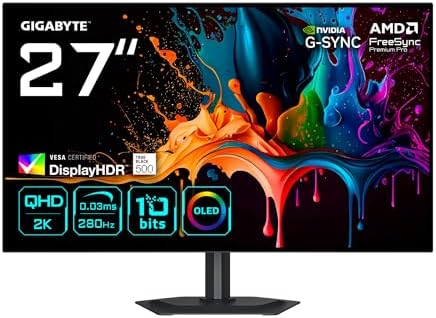
GIGABYTE MO27Q28G 27" 1440p WOLED Monitor
A sub-$600 4th-gen Tandem WOLED that finally makes OLED a sensible productivity pick — 1440p, 280Hz, and a real burn-in warranty.
Price may vary. As an affiliate, we earn from qualifying purchases.
What we like
- 4th-gen Tandem WOLED panel runs cooler and dimmer-at-rest, which directly improves burn-in odds
- 1440p at 27" hits the productivity sweet spot — sharp text without DPI scaling headaches
- 280Hz refresh and 0.03ms response are essentially free if you ever game on it
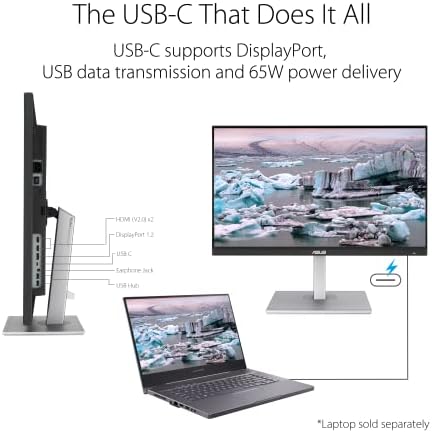
- USB-C with KVM means one cable for a laptop and a one-button switch back to the desktop
- 3-year warranty explicitly includes panel burn-in coverage
Could be better
- 335 cd/m² full-screen brightness is fine indoors but struggles next to a sunny window
- No USB-C power delivery spec high enough to charge a 16" MacBook Pro at full tilt
- Stand is height- and tilt-adjustable only — no swivel or pivot
Full Review
OLED finally crossed the line where it makes sense for a work-first monitor, and the MO27Q28G is the clearest example. At $549 you get a 4th-gen Tandem WOLED panel — the same architecture LG is shipping in its premium TVs — in a 27” 1440p shell with a refresh rate that would have cost twice this two years ago. The pitch isn’t gaming. It’s that OLED contrast and instant pixel response are now affordable enough for people who mostly write, code, edit, and occasionally play.
The Panel Is the Story
4th-gen Tandem WOLED stacks two emissive layers so each one runs at lower brightness for the same on-screen result. That matters for two reasons: less heat means slower pixel aging, and the panel can hit higher peaks without cooking itself. In practice the MO27Q28G holds around 335 cd/m² full-screen and pushes well past 1,000 in small HDR highlights. Text is the real revelation — RGB subpixel structure on this generation is cleaner than older WOLED, and fringing on small fonts is genuinely hard to spot at normal viewing distance.
1440p at 27” Is the Right Call
This is the resolution conversation people get wrong with OLED. A 4K 27” panel (the PG27UCDM, MPG 272URX tier) is gorgeous but starts at $1,000+, and macOS still handles 27” 4K awkwardly without fractional scaling. 1440p at 27” is roughly 109 PPI — the same density as a 32” 4K — and every OS renders it natively without scaling tricks. For a productivity monitor that’s the better engineering tradeoff.
USB-C KVM and Daily Use
One USB-C cable handles video, data, and (limited) charging from a laptop, and the KVM button on the back swaps keyboard and mouse between USB-C and DisplayPort inputs. The brightness limiter is more aggressive than QD-OLED competitors — open a full white browser window and you’ll see it dim slightly within a few seconds. That’s the panel protecting itself, and you stop noticing it after a week.
How It Compares
Against the LG 27GS95QE — the previous-gen WOLED at a similar price — the MO27Q28G is brighter, sharper on text, and has better burn-in mitigation. Against the 4K QD-OLED tier (PG27UCDM, MPG 272URX), you give up resolution and roughly 100 cd/m² of full-screen brightness to save $500+. For most desk workers that’s the correct trade.
Who Should Buy This
Buy the MO27Q28G if you want your first OLED for a work-first desk and refuse to spend $1,200 to get there. It’s the right resolution for 27”, the refresh rate is a free bonus, and the burn-in warranty removes the last real objection. If you need to charge a high-wattage laptop over a single cable or you want 4K sharpness for photo work, step up to a 4K QD-OLED instead.