LG UltraFine evo 32U990A-S 32" 6K Thunderbolt 5 Monitor
The world's first Thunderbolt 5 monitor pairs a 6K 224-PPI Nano IPS Black panel with 80Gbps bandwidth and 96W charging on a single cable.
Price may vary. As an affiliate, we earn from qualifying purchases.
What we like
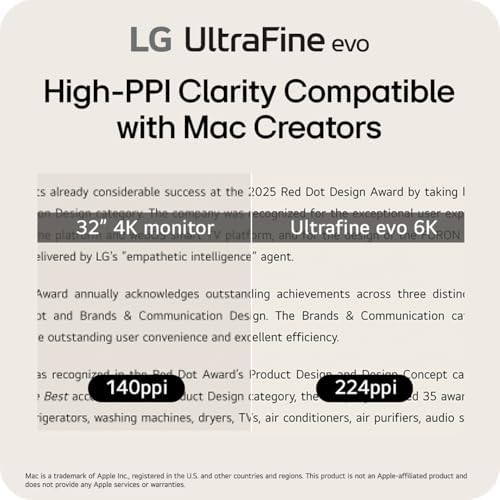
- 224 PPI matches Apple Studio Display sharpness on a larger 32-inch panel
- First-to-market Thunderbolt 5: 80Gbps and 96W charging over one cable
- Excellent color: 99.5% Adobe RGB, 98% DCI-P3, true 10-bit
- Nano IPS Black delivers deep blacks and strong contrast for IPS
Could be better
- DisplayHDR 600 with ~450 nits is fine for SDR but mediocre for real HDR
- 60Hz only — not for gaming or high-refresh workflows
- $1,999 is a serious investment, and you need a TB5 host to use the headline feature
Full Review
The LG UltraFine evo 32U990A-S is the first shipping monitor with Thunderbolt 5, and that alone makes it notable. But the more interesting story is the pixel density. At 6144x3456 across a 31.5-inch panel, you get 224 PPI — the exact same density as Apple’s Studio Display, just on a much larger screen. That combination has, until now, only existed in Apple’s $4,999 Pro Display XDR. LG is selling it for $1,999.
The Panel
This is a Nano IPS Black panel, LG’s higher-contrast IPS variant, and it shows. Blacks are genuinely deep for an IPS display, and the contrast ratio is noticeably better than a standard IPS monitor without the viewing-angle compromises of VA.
Color coverage is the headline for creative work: 99.5% Adobe RGB, 98% DCI-P3, and true 10-bit reproduction. For photographers and print designers, that Adobe RGB number matters more than the DCI-P3 figure most monitors lead with. Text rendering at 224 PPI is flawless — at normal viewing distance individual pixels are invisible, which is the whole point of buying 6K over 4K.
Thunderbolt 5 in Practice
Thunderbolt 5 delivers 80Gbps of bandwidth — double Thunderbolt 4 — plus 96W of charging over a single cable. For a laptop user, that means one cord handles the 6K signal, charges the machine, and drives the downstream USB and Ethernet hub. The bandwidth headroom also makes 6K daisy-chaining viable in a way TB4 couldn’t comfortably manage.
The catch: you need a Thunderbolt 5 host to get any of this. On a TB4 or older USB-C machine the monitor still works, but you’ve paid for a feature you can’t use yet. Charging also tops out at 96W, which fully powers a 14-inch MacBook Pro but won’t keep a maxed-out 16-inch model at full draw.
Where It Falls Short
HDR is the weak spot. DisplayHDR 600 with peak brightness around 450 nits is fine for SDR content and bright rooms, but it’s not a true HDR-grading display — if HDR mastering is your job, this isn’t the panel. It’s also a 60Hz monitor, so gamers and anyone wanting a high-refresh desktop should look elsewhere.
How It Compares
The natural rivals are the ASUS ProArt PA32QCV 6K and Apple’s Studio Display. The ProArt undercuts LG on price but ships with Thunderbolt 4, not 5. The Studio Display matches the density but locks you into Apple’s ecosystem at a higher price with fewer ports and no HDR. If you want future-proof bandwidth and the widest color gamut, the LG is the pick. If you only care about a clean 5K Mac experience, the Studio Display is simpler.
Who Should Buy This
Buy this if you’re a photographer, designer, or video editor who wants Studio Display sharpness on a 32-inch canvas with proper Adobe RGB coverage and the connectivity to last several upgrade cycles. It’s an especially strong match for anyone already on a Thunderbolt 5 machine. Skip it if you need real HDR mastering, high refresh rates, or you’re on an older Mac where the TB5 advantage goes unused — in those cases the cheaper ProArt 6K makes more sense.