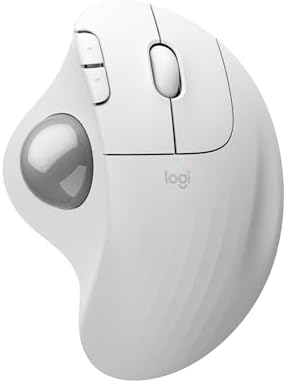
Logitech ERGO M575S Wireless Trackball
The gateway trackball — a thumb-operated, ergonomically certified mouse that keeps your forearm still and may save the career of anyone with wrist or shoulder issues.
Price may vary. As an affiliate, we earn from qualifying purchases.
What we like
- Cursor moves without your arm moving — huge relief for wrist, elbow, and shoulder pain
- Quieter clicks than the original M575, less fatiguing in shared spaces
- 18-month battery life on a single AA
- Dual-device pairing via Bluetooth and the new Logi Bolt receiver
- Logi Ergo Lab certified for 25% less forearm strain
Could be better
- Steep learning curve — expect 3-5 days of feeling clumsy
- Only 3 customizable buttons via Logi Options+
- Trackball needs occasional cleaning to stay smooth
Full Review
The M575S is the 2024 refresh of Logitech’s beloved thumb trackball, and the changes are small but meaningful: quieter switches, the more secure Logi Bolt receiver instead of the aging Unifying dongle, and a tweaked sensor. Everything else — the shape, the price, the famous 18-month battery — stays the same. That’s a good thing.
The Trackball Learning Curve Is Real
For the first three days, you will feel like you’ve forgotten how to use a computer. Hitting small UI targets is genuinely hard. By day five, you stop thinking about it. By week two, reaching for a regular mouse feels weird and inefficient.
The key insight: your thumb does the pointing, but your index and middle fingers still click. Once that motor pattern locks in, you can keep your wrist completely planted while your cursor flies around a 4K display.
Why It Saves Wrists and Shoulders
Traditional mice make you move your entire forearm — and over an 8-hour workday, that’s thousands of small shoulder and wrist motions. The M575S kills all of them. Your hand stays in one spot, palm fully supported on the sculpted body, while only your thumb moves.
If you have RSI, a rotator cuff issue, lateral epicondylitis (“mouse elbow”), or you’ve been told by a hand surgeon to “stop using a mouse,” this device is often the answer. It’s certified by Logi Ergo Lab for a 25% reduction in forearm muscle strain, and that matches what most long-term users report anecdotally.
What Got Better in the S Refresh
The clicks are noticeably quieter — closer to an MX Master than the clacky original M575. The Logi Bolt receiver is encrypted and enterprise-friendly, which matters if your IT department has banned Unifying dongles. Pairing across two devices via the bottom switch is fast and reliable.
The trackball itself still pops out from below with a gentle push for cleaning. Plan on doing this every few weeks — dust and skin oil build up on the support bearings and cause skipping. Thirty seconds with a microfiber cloth fixes it.
Who Should Buy This
Anyone with wrist, elbow, or shoulder pain who hasn’t tried a trackball — this is the cheapest, lowest-risk way to find out if trackballs are your answer. It’s also the right pick for cramped desks where you don’t have room to swing a mouse, and for anyone setting up a secondary couch or recliner workstation.
Skip it if you play competitive FPS games (trackballs are precise but not fast enough for flick aim), if you do precision photo retouching at the pixel level, or if you absolutely refuse to spend a week feeling slow. For everyone else, the M575S is the easiest ergonomic upgrade you can make for fifty bucks. If you want more buttons, tilt adjustment, and a scroll wheel that does horizontal scrolling, the MX Ergo S is the step-up pick at roughly double the price.