Nearity V30S 4K Conference Webcam
An all-in-one 4K conference cam with built-in mics and speaker that turns a shared desk or huddle room into a meeting station without a separate speakerphone.
Price may vary. As an affiliate, we earn from qualifying purchases.
What we like
- Built-in dual MEMS mics and a full-duplex speaker — no separate speakerphone needed
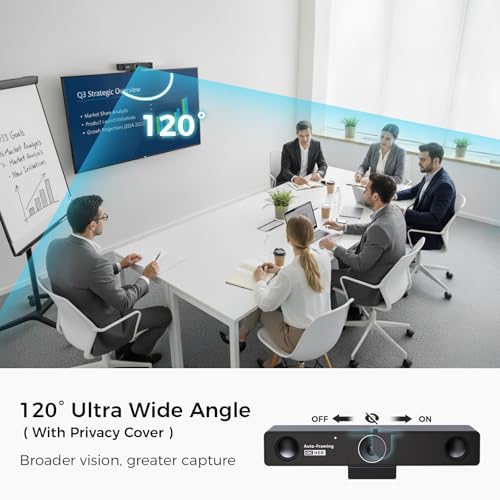
- Sharp 4K/8MP sensor with a genuinely wide 120° field of view
- AI speaker tracking and noise cancellation that handle real room chatter
- True USB plug-and-play; no drivers or software to install
Could be better
- Overkill (and overpriced) for a solo desk setup
- 120° FOV is wide enough to pull in clutter behind you
- Single-unit mic pickup tops out around 16ft — large rooms need expansion mics
Full Review
The Nearity V30S is built for a specific job: turning a shared space into a meeting room without a tangle of separate gear. It combines a 4K camera, a dual-mic array, and a speaker into one bar that sits on top of a monitor or on its tripod. For a small huddle room or a hot desk, that consolidation is the whole point.
Picture Quality
The 8MP sensor outputs a clean 4K image, and the 120° field of view is the real selling feature — it fits three or four people around a table into frame without anyone leaning in. AI speaker tracking and 3X digital zoom let it crop toward whoever’s talking, which works well enough in practice that you forget it’s happening.
The trade-off with 120° is honesty about your background. That much width pulls in the whiteboard, the doorway, and whatever’s stacked on the credenza. In a tidy conference room it’s an asset; at a messy desk it’s a liability.
Audio Is the Differentiator
This is where the V30S separates itself from a webcam like the Insta360 Link 2. The dual MEMS mics and integrated full-duplex speaker mean the people on the other end can hear the room and the room can hear them — no Jabra or Poly speakerphone on the table. Pickup covers about a 16ft radius, and the AI noise cancellation does a real job on keyboard clatter and HVAC hum.
For a single conference unit that’s plenty. Push into a larger boardroom and you’ll want the optional expansion mics, because one bar can only reach so far.
Setup and Daily Use
It’s genuinely plug-and-play over USB — no drivers, no companion app required. On-device buttons and a remote handle zoom, volume, and the AI modes, so a guest can walk up and use it without a tutorial. Zoom, Teams, and Google Meet all see it as a standard camera and mic immediately. Mount it via the display clip, the included tripod, or any 1/4” stand.
Who Should Buy This
Buy the V30S if you run a small huddle room or a hot-desk space that needs to become a real meeting station on demand — the built-in audio is what justifies the $299 over a camera-only competitor. If you’re a solo worker on a tidy desk, this is too much camera and too much money; a standard 4K webcam will serve you better. And if you’re outfitting a full-size boardroom, plan on the expansion mics from day one.