Desk Accessories · Review
OBSBOT Meet 2 4K AI Webcam
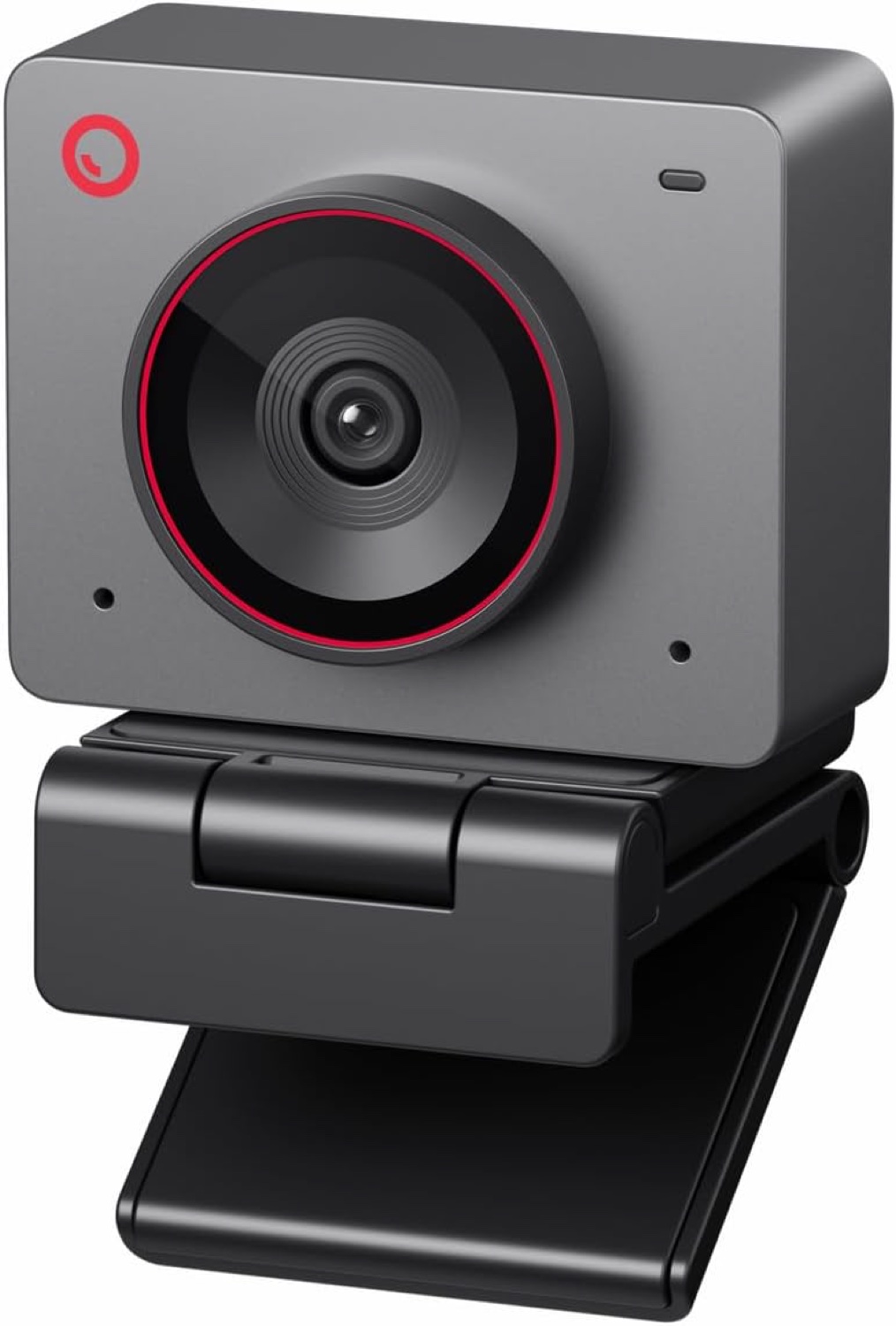
A tiny 4K webcam with a 1/2-inch sensor, AI framing, gesture control and dual mics. At $99 it undercuts pricier rivals for video-call-heavy desks.
Published
Our verdict
4.3 / 5
Price at time of review
$99
Prices change. As an affiliate, we earn from qualifying purchases — it never decides the verdict.
What we like
- Large 1/2-inch CMOS sensor gives clean, bright 4K/30 video, with 1080p/60 for smoother calls
- AI framing and autofocus keep you centered, and they also handle groups
- Gesture control lets you toggle framing and zoom with a hand wave, with no software needed mid-call
- Tiny 40.5g body takes almost no desk space and travels easily
- Single USB-C connection and strong value at $99
Could be better
- Fixed body with no gimbal pan or tilt, so the AI relies on cropping into the frame
- The company notes the camera can run warm during use
- Dynamic range is only decent, and some reviewers needed to tweak settings to brighten the image
- Dual mics are fine for calls but won't replace a dedicated microphone
Full Review
Build and Design
The Meet 2 is very small. At 40.5 grams and roughly earbud-sized, it’s one of the lightest 4K webcams you can buy. It sits easily on a monitor or laptop lid without pulling the screen forward. It comes in several colors, which is a nice touch if you care about how your desk looks.
The tradeoff is that it’s a fixed-body camera. There’s no motorized gimbal, so all the “tracking” is done digitally inside the frame. The listing also warns that it can get warm during use. That’s worth knowing if you run it for long meeting days.
Image and Audio
The 1/2-inch sensor is large for a webcam this cheap. In decent light it gives sharp, bright 4K at 30fps, and you can drop to 1080p at 60fps for smoother motion on calls. The wide 79.4-degree diagonal view fits you and some of your background without looking distorted.
It isn’t flawless. Dynamic range is only decent, and you may need to adjust exposure in the OBSBOT Center software to get the look you want. The dual microphones filter keyboard noise and ambient sound well enough for meetings. If audio matters to you, pair the webcam with a proper mic.
AI Features in Daily Use
The AI framing is the main reason to buy this camera. It keeps you centered as you move and adapts when more people join the shot. Autofocus is quick and stays locked on you.
Gesture control is more useful than it sounds. A raised palm toggles framing, and a pointed finger adjusts zoom. You can do both without opening any software mid-call. Setup is plug-and-play over one USB-C cable, and the OBSBOT Center app is there when you want deeper control.
How It Compares
If you want physical pan and tilt, look at the Insta360 Link 2 instead. Its gimbal tracks without cropping, and it costs more. If you’d rather have a polished, business-oriented option with strong software integration, consider the Logitech MX Brio. The Meet 2 matches much of their image quality for a lot less at $99.
Who Should Buy This
Buy the Meet 2 if you spend much of your day on video calls and want sharp 4K, reliable AI framing and a tiny footprint without paying $200 or more. It also suits people who move between desks or carry a webcam in a bag.
Skip it if you want a motorized gimbal, if you need the best low-light and dynamic range at any price, or if you want a camera that doubles as your main microphone. For those needs, look at the Insta360 Link 2 or a dedicated mic.