Razer Huntsman V3 Pro TKL Esports Keyboard
Razer's analog optical answer to Wooting — adjustable actuation, Snap Tap, and Rapid Trigger in a tenkeyless esports shell.
Price may vary. As an affiliate, we earn from qualifying purchases.
What we like
- Analog optical Gen-2 switches with 0.1–4.0mm adjustable actuation per key
- Snap Tap and Rapid Trigger genuinely change counter-strafing and fast-input games
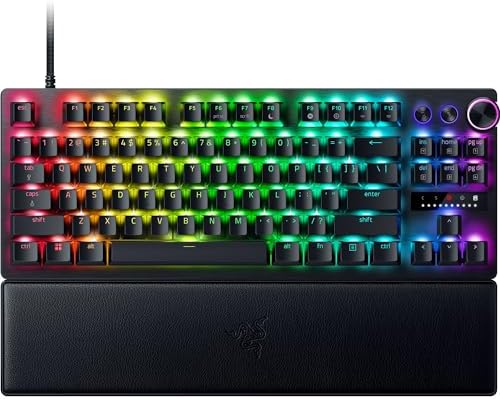
- Doubleshot PBT keycaps and brushed aluminum top plate feel premium
- Magnetic leatherette wrist rest is one of the better OEM rests included with a keyboard
Could be better
- $190 is steep when the Wooting 80HE undercuts it and the Keychron Q1 HE matches features for less
- Standard model is locked to 1000Hz polling — the 8KHz Niko Edition is a separate, pricier SKU
- Synapse software is bloated and demands a login for basic per-key tuning
Full Review
The Huntsman V3 Pro TKL is Razer’s stake in the ground for the analog-switch era. While Wooting, Keychron, and basically every other premium gaming brand have piled onto Hall Effect, Razer publicly doubled down on optical and shipped this. The argument: a light beam can measure travel with sub-millimeter precision that magnetic sensors can’t match. Whether that’s a real competitive edge or marketing is a debate that won’t end any time soon — but the keyboard itself is excellent regardless.
Switches and Feel
The Gen-2 analog optical switches feel like a smooth linear with a touch more weight than a Red. The 0.1–4.0mm adjustable actuation is the headline: you can set WASD to a hair-trigger 0.2mm for movement and your number row to 2.5mm so you stop fat-fingering grenades. Rapid Trigger resets the input the moment you start lifting the key, which is the feature that actually matters for counter-strafing in CS2 and Valorant. Stock lube is good, sound is muted, and there’s no rattle on the stabilized keys.
Snap Tap and the Software
Snap Tap is the spicy one. Bind two keys (typically A and D) and the keyboard always honors the most recent input, eliminating the dead frame when you switch directions. Valve and Riot have both signaled that this kind of feature lives in a gray area — Razer ships it anyway, and it works exactly as advertised. The catch is Synapse. You’ll be living in it to tune per-key actuation and macros, and it remains heavier and more login-gated than it has any right to be.
Build and Layout
The TKL footprint and brushed aluminum top plate make this a genuinely desk-friendly keyboard, not a gamer billboard. Doubleshot PBT keycaps are textured and shine-resistant. The media dial in the top right is a small touch that’s surprisingly useful for volume during calls. The magnetic wrist rest snaps on cleanly and is actually pleasant to use — most bundled rests get thrown in a drawer; this one doesn’t.
V3 Pro TKL vs. Wooting 80HE
This is the real question. The Wooting 80HE uses Hall Effect Lekker switches, hits 8000Hz polling natively, and costs less. The Huntsman V3 Pro TKL counters with better build quality, a nicer wrist rest, and Razer’s claim of superior precision from optical. In practice, both are top-tier — pick the Huntsman if you’re already in the Razer ecosystem or want a more refined out-of-box feel. Pick the Wooting if you want maximum polling rate, a more open ecosystem, and to save $40.
Who Should Buy This
Competitive FPS players who want the full analog-switch toolkit — Rapid Trigger, Snap Tap, per-key actuation — in a keyboard that doesn’t look out of place on a work desk. If you don’t play games where 0.2mm of travel matters, this is overkill and a standard mechanical at half the price will serve you better. If you want 8KHz polling out of the box, look at the Niko Edition sub-variant or the Wooting 80HE instead.