Wacom Cintiq Pro 17 Pen Display
A 17.3" 4K 120Hz pen display with Pro Pen 3 and Pantone-validated color — the premium pick for designers, illustrators, and colorists working from home.
Price may vary. As an affiliate, we earn from qualifying purchases.
What we like
- 4K 120Hz display with near-zero pen latency
- Pro Pen 3 has 8,192 pressure levels and a customizable, rechargeable-free design
- Pantone Validated and Pantone SkinTone Validated for accurate color work
- 10-point multi-touch on edge-to-edge etched glass
Could be better
- $2,499 puts it out of reach for hobbyists
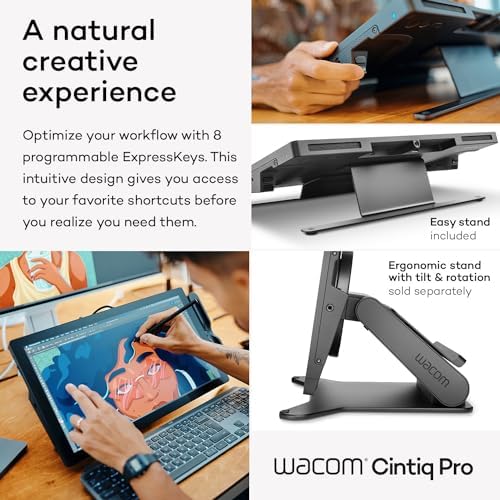
- No built-in stand — you'll want the (extra) adjustable stand
- Requires a host computer; it's a display, not a standalone tablet
Full Review
Most of what we cover here is gear that pays for itself in a month of saved back pain or cleaner cable runs. The Cintiq Pro 17 is different. At $2,499 it’s a professional tool for a small slice of our audience — the illustrators, retouchers, motion designers, and video colorists who run a creative business from a spare bedroom. For them, this is the home-office centerpiece. For everyone else, it’s overkill, and we’ll say so plainly.
The Display Does the Heavy Lifting
The 17.3” 4K panel is the reason to buy this over anything cheaper. It pushes 1.07 billion colors, hits 120Hz, and is both Pantone Validated and Pantone SkinTone Validated — meaning the skin tones you paint or grade on screen actually match what comes off the printer or out to delivery. That validation is the line between “drawing tablet” and “color-critical workstation.”
The 120Hz refresh rate matters more than the spec sheet suggests. Ink lands under the pen tip with almost no perceptible lag, and the etched, edge-to-edge glass gives just enough tooth to feel like a surface rather than slick plastic.
Pro Pen 3 and Touch
The Pro Pen 3 is the headline accessory. 8,192 pressure levels is the same ceiling as the older Pro Pen 2, but the real upgrade is physical: you can swap grips, add or remove weight, and reposition the center of balance. It never needs charging. Three programmable side switches and 10-point multi-touch let you zoom, rotate, and navigate with your off hand while you draw — the workflow that makes a Cintiq feel like working on paper instead of operating software.
Cintiq Pro 16 vs. iPad Pro
If you already own the older Cintiq Pro 16, the jump to the 17 is incremental — a slightly larger panel, 120Hz, and the new pen. Worth it on a hardware refresh cycle, not as a mid-cycle upgrade.
The more honest comparison is an iPad Pro running Sidecar or a tethered app like Astropad. An iPad Pro is portable, half the price, and genuinely good for sketching and ideation. But it can’t match the 17’s screen size, color validation, or the precision of working directly inside desktop Photoshop, Procreate Dreams, or DaVinci Resolve at full resolution. The iPad is a sketchbook; the Cintiq is a finishing station.
One catch worth budgeting for: there’s no built-in stand. Plan on adding Wacom’s adjustable stand or a VESA arm to get a usable working angle.
Who Should Buy This
Buy the Cintiq Pro 17 if drawing, retouching, or color grading is how you earn a living and you need a color-accurate, full-size surface wired into a real desktop. If you’re a hobbyist, a student, or someone who sketches between tasks, an iPad Pro or the smaller Cintiq 16 will serve you better for a fraction of the cost.
Sources: Wacom Cintiq Pro 17 on Amazon